LinkedIn Matched Audiences vs. Firmographic Targeting: Which Wins?
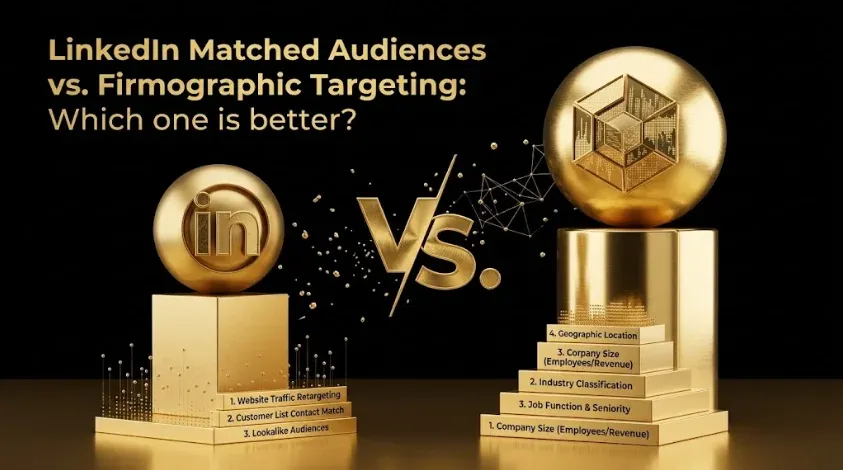
Quick answer: LinkedIn Matched Audiences target people from your own uploaded lists — account lists, contact lists, website retargeting, and lookalikes — while firmographic targeting uses LinkedIn’s native filters (industry, company size, job title, seniority). For B2B, matched audiences built from your own data often outperform native filters, because your list of real target accounts is more precise than any combination of LinkedIn’s attributes. But native targeting is essential for reaching people who aren’t yet on your radar. The strongest programs use both: matched audiences for precision, firmographic filters for discovery.
Key takeaways
- Matched Audiences = your data (account/contact lists, retargeting, lookalikes).
- Firmographic = LinkedIn’s filters (industry, size, title, seniority).
- Your lists often win — a real target-account list beats attribute filters on precision.
- Native filters find new accounts you couldn’t list yourself — discovery, not precision.
- Use both: matched for precision and ABM, firmographic for reach and prospecting.
Targeting is where most LinkedIn budgets are won or lost, and the choice between your own lists and LinkedIn’s native filters is the central decision. This guide covers what Matched Audiences are, why first-party lists frequently outperform native targeting, the match-rate reality nobody mentions, and how to combine the two.
What are LinkedIn Matched Audiences?
LinkedIn Matched Audiences are audiences you build from your own first-party data rather than from LinkedIn’s attributes. There are four main types:
- Company (account) lists — upload a list of target companies to reach people at those accounts. The backbone of ABM on LinkedIn.
- Contact lists — upload specific people (emails) to target them directly.
- Website retargeting — reach people who visited your site (requires the LinkedIn Insight Tag).
- Lookalike / predictive audiences — let LinkedIn find people similar to a source audience you provide.
The common thread: they start from your data, so they reflect your actual ICP and pipeline rather than a guess assembled from filters.
Matched Audiences vs. firmographic targeting
| Dimension | Matched Audiences (your data) | Firmographic (LinkedIn filters) |
|---|---|---|
| Source | Your account/contact lists, site visitors | LinkedIn’s attributes |
| Precision | Very high (real target accounts) | Medium (attribute approximation) |
| Reach beyond your list | No | Yes — finds new accounts |
| Best for | ABM, retargeting, known ICP | Prospecting, discovery, scale |
| Data dependency | Needs a good list | Needs none |
| Freshness | As current as your list | LinkedIn’s profile data |
The key insight: they solve different problems. Matched Audiences are about precision (reach exactly these accounts); firmographic targeting is about discovery (reach accounts that fit these attributes, including ones you haven’t identified).
Why do first-party lists often outperform native targeting?
Because a list of your real target accounts is more accurate than any combination of LinkedIn’s filters. Firmographic targeting approximates your ICP — “SaaS companies, 200–1,000 employees, VP+ in marketing” — but that approximation includes plenty of poor-fit accounts and misses good-fit ones that don’t match the filters cleanly. Your ICP-derived account list, by contrast, contains the specific companies you’ve decided are worth pursuing, often refined by intent data and sales input. Targeting that list directly removes the approximation error. In practice, teams that move from broad firmographic targeting to tight account lists frequently see better engagement and lower cost per qualified lead, because they stop paying to reach approximately-right people.
There’s also a control advantage: you own and update the list, so you can add accounts showing intent, remove closed or churned accounts, and align targeting exactly with sales priorities.
When should you use native firmographic targeting?
Firmographic targeting earns its place when you need to reach beyond your own list:
- Prospecting and discovery — finding good-fit accounts you haven’t identified yet.
- Scale — when your account list is too small to spend against efficiently.
- New markets — entering a segment where you don’t yet have a target list.
- Broad demand creation — top-of-funnel Thought Leader Ads to a wide ICP-fit audience.
- Layering onto matched audiences — applying title/seniority filters on top of a company list to reach the right people at the right accounts.
That last use is important: matched and firmographic targeting aren’t mutually exclusive within a campaign. A common, powerful setup is a company list (matched) plus a seniority-and-function filter (firmographic) — the right people at exactly the right accounts.
The match-rate reality nobody mentions
Here’s the caveat that determines whether Matched Audiences work: not everyone on your uploaded list will match. LinkedIn matches your emails or companies against its profiles, and the match rate is never 100% — some contacts use different emails, some companies are listed differently, and small lists can fall below LinkedIn’s minimum audience size to even run. Practical implications:
- Upload clean, complete data. More fields and accurate company names raise match rates.
- Expect shrinkage. A 5,000-contact list may yield a substantially smaller matched audience.
- Mind the minimum. Very small account lists may not reach LinkedIn’s minimum audience threshold; you may need to broaden or combine.
- Company lists usually match better than contact lists, because company matching is less brittle than email matching.
Ignore match rates and you’ll build a campaign against a fraction of the audience you think you have.
Field note: The most common targeting mistake on LinkedIn is defaulting to native firmographic filters because they’re the path of least resistance — you just pick attributes and go. But those filters are an approximation of an ICP you probably already have as a real account list sitting in your CRM. Uploading that list as a Matched Audience almost always tightens targeting and lifts qualified-lead efficiency, because you’re reaching the accounts you actually chose rather than a filter’s best guess at them. Start from your list; use filters to extend it, not replace it.
How do you combine them effectively?
The strongest programs layer the two by funnel stage and goal:
- Retargeting (matched): re-engage site visitors and prior ad engagers — your warmest audience; see Linkedin Ads ABM Retargeting Companies Viewed Ads Didnt Convert.
- Account list + role filter (matched + firmographic): reach specific titles at your target accounts — the ABM core.
- Lookalikes (matched-derived): expand from your best customers to similar profiles.
- Firmographic prospecting: discover new ICP-fit accounts beyond your list, then add engagers to your matched audiences.
This creates a loop: firmographic targeting discovers accounts, engagement and intent qualify them, and they graduate into your precise matched audiences.
Honest limitations
- Matched Audiences are only as good as your list. A stale or poorly-built account list targets the wrong companies precisely — precision amplifies a bad list as readily as a good one.
- Match rates cap your reach. You’ll always reach fewer than you upload; plan for it.
- Minimum audience sizes constrain small lists. Tight 1:1 ABM may be too small to run as its own campaign and may need combining.
- Firmographic filters drift from reality. LinkedIn’s profile data can be outdated (old titles, old companies), so native targeting inherits that noise.
- Neither fixes a weak offer. Perfect targeting still needs a message worth responding to.
How do you measure which targeting works?
Compare matched and firmographic audiences on cost per qualified lead and pipeline, not CPL or impressions. Because matched audiences reach known target accounts, judge them at the account level — engagement and pipeline from target accounts — not just lead counts. Connecting LinkedIn and CRM data makes “which targeting approach produced more qualified pipeline per dollar?” a direct question via the LinkedIn Ads MCP and the complete MCP stack, and pairs with lead scoring to define quality. See LinkedIn Ads Benchmarks 2026 for cost context.
Frequently Asked Questions
Q1. What are LinkedIn Matched Audiences?
Matched Audiences are audiences built from your own first-party data rather than LinkedIn’s attributes — company (account) lists, contact lists, website retargeting, and lookalikes. They let you target the specific accounts and people you’ve identified as your ICP, rather than approximating them with filters.
Q2. Are Matched Audiences better than firmographic targeting?
Often, for precision — a real target-account list beats attribute filters because it removes the approximation error and reflects accounts you actually chose. But firmographic targeting is essential for discovering new accounts beyond your list. The best programs use both: matched for precision, firmographic for reach.
Q3. When should you use LinkedIn’s firmographic targeting?
For prospecting and discovery (finding good-fit accounts you haven’t identified), for scale when your list is small, for entering new markets, for broad demand creation, and for layering title/seniority filters on top of a company list to reach the right people at target accounts.
Q4. Why don’t all my uploaded contacts match on LinkedIn?
Because LinkedIn matches your data against its profiles and the match rate is never 100% — contacts may use different emails, companies may be listed differently, and small lists can fall below the minimum audience size. Clean, complete data and company (vs. contact) lists improve match rates.
Q5. Can you combine Matched Audiences and firmographic targeting?
Yes, and it’s often the best approach — for example, a company (account) list plus a seniority-and-function filter reaches exactly the right people at exactly the right accounts. You can also use firmographic targeting to discover accounts, then graduate engaged ones into precise matched audiences.
Q6. What’s the minimum audience size for LinkedIn Matched Audiences?
LinkedIn enforces a minimum audience size to run a campaign, so very small account or contact lists (common in tight 1:1 ABM) may not be large enough on their own and may need broadening or combining with filters. Confirm the current minimum in Campaign Manager.
Q7. How do you measure targeting performance on LinkedIn?
Compare audiences on cost per qualified lead and pipeline, not CPL or impressions, and judge account-based matched audiences at the account level (engagement and pipeline from target accounts). Connect LinkedIn to your CRM to see which targeting approach produced more qualified pipeline per dollar.
Sources & further reading
- LinkedIn Campaign Manager documentation — Matched Audiences, list uploads, match rates, and minimum audience sizes (confirm current specifics).
- Compare targeting approaches on cost per qualified lead and account-level pipeline using your own CRM data.
This guide is educational; match rates, minimum audience sizes, and targeting options change, so validate current specifics in Campaign Manager and test against your own results.
Related guides: B2B SaaS Ad Testing Framework Google Ads Linkedin Ads 2026 · Intent Data for B2B SaaS · ICP Definition for B2B SaaS · Google Ads Budget Split B2B SaaS Brand Nonbrand Retargeting Demand Gen 2026 · LinkedIn Ads Benchmarks 2026.