Negative Keyword Strategy for B2B SaaS Google Ads (2026): The Complete Guide
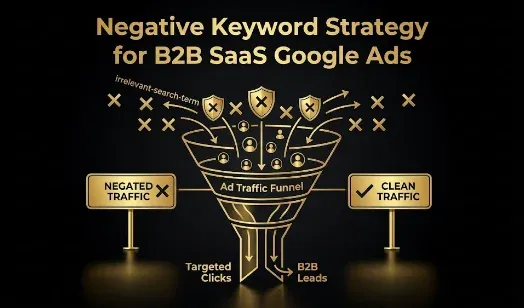
Quick answer: In B2B SaaS, negative keywords are not a setup afterthought, they are the main thing standing between your budget and the job seekers, students, free-tool hunters, and researchers whose searches look like buyer intent but never convert. In 2026, with Google’s broad match and AI Max matching your ads to ever more “thematically related” queries, an aggressive, well-maintained negative list is the counterbalance that keeps automation pointed at buyers. The strategy has four parts: block the universal non-buyer categories (job seekers, free/cheap seekers, educational and DIY intent) at the account level; use the right match type for each negative (broad for terms that are always irrelevant like “jobs,” but never broad for terms like “free” that can appear in real buyer queries); manage negatives per campaign where context differs; and mine your search terms report every week, because the list is never finished. Done right, this is one of the highest-return, lowest-cost moves in a B2B SaaS account, since roughly 40% of B2B budget leaks to unqualified clicks without it.
Key takeaways
- Negatives are the counterbalance to broad match and AI Max, which match ever-broader queries in 2026.
- Block the universal non-buyers: job seekers, free/cheap seekers, educational and DIY intent.
- Match type matters: broad negatives for always-irrelevant terms, never broad for terms like “free.”
- Account-level list for universals; campaign-level for context (a term can be a negative in one campaign, a keyword in another).
- Mine the search terms report weekly and add PMax/AI Max negatives at the account level.
Every B2B SaaS Google Ads account is showing ads for searches that will never convert, not because the targeting is wrong, but because SaaS keywords attract audiences who look like buyers and aren’t: job seekers researching an employer, students doing coursework, consumers hunting a free tool, and analysts doing research. Negative keywords are how you stop paying for them. This is the complete 2026 negative keyword strategy for B2B SaaS: the categories, the match-type rules, the account-versus-campaign structure, how to handle Performance Max and AI Max, and the ongoing process that keeps it working. (For the closely related question of when to use broad match at all, see the broad-match guardrails guide; this post is the negative-keyword foundation it relies on.)
Why negative keywords matter more than ever in 2026
Because Google’s matching has never been broader. Broad match and AI Max are more aggressive than ever in 2026, deliberately expanding your reach to queries that are “thematically related” but often commercially irrelevant, and Smart Bidding is built to pair with that expansion. A SaaS company bidding on “project management software” now routinely matches to “project management certification,” “project management job description,” or “project management tutorial,” none of which will ever buy. The broader Google’s matching gets, the more essential your negative list becomes as the counterbalance, which is why in 2026 an aggressive negative strategy is not optional. And the stakes are quantified: analyses of B2B SaaS accounts consistently find roughly 40% of budget leaking to unqualified clicks when negatives are neglected, and a study of 300+ B2B SaaS accounts found non-ICP and non-buyer traffic to be one of the single largest categories of wasted spend. The uncomfortable truth is that automation has made negatives more important, not less: the more you let Google’s AI expand your reach, the more disciplined your exclusions have to be, because the algorithm optimizes toward the cheapest conversions and in B2B the cheapest conversions are the junk ones.
The payoff is not only saved budget. Cutting irrelevant queries lifts your click-through rate (the people who do see your ad are more likely to want it), which raises Quality Score, and a higher Quality Score lowers your cost per click and improves ad rank across the account. So negatives compound: they stop wasted spend directly, and they indirectly make every remaining click cheaper by improving the relevance signals Google rewards. They also protect conversion rate and cost per conversion, because the traffic that remains is more likely to be real buyers. In other words, a disciplined negative list improves CTR, Quality Score, CPC, and conversion rate at the same time, which is why it is one of the few genuinely compounding levers in a B2B SaaS account.
The categories to block (and the ones to think twice about)
B2B SaaS non-buyer traffic clusters into a few reliable categories. The universal ones, which are almost never relevant for a paid B2B SaaS product, belong in a shared account-level exclusion list:
- Job seekers. The single most consistent source of wasted B2B spend: jobs, careers, hiring, salary, internship, resume, CV, “cover letter,” “interview questions,” glassdoor, indeed. People researching your company as an employer are not buyers.
- Free and cheap seekers (for a paid product). free, “open source,” cheap, freemium, cracked, pirated, torrent. These attract users who will not pay, unless a free trial or free tier is your primary conversion (see the caution below).
- Educational and DIY intent. tutorial, course, certification, training, “how to,” “how to build,” template, “what is,” definition, example, wikipedia. These are learners and researchers, not buyers.
- Wrong-audience and consumer terms. Depending on your product, personal/consumer modifiers, student terms, and hobbyist terms that signal the wrong segment.
Then there are the terms that require judgment rather than a blanket block. Words like “API,” “small business,” “freelancer,” “vs,” “alternatives,” and “free” can be either junk or your best buyers depending on your product. “Alternatives” and “vs” are often high-intent comparison queries you want; “small business” is junk for an enterprise tool but core for an SMB tool; “free” is junk for a paid-only product but essential if you run a free trial. The rule: never blanket-block a term that could appear in a real buyer query. Blocking these requires knowing your ICP and your funnel, which is exactly why a generic downloaded list applied blindly is dangerous, covered next.
The categories map to a match type and a scope, which is the whole strategy in one view:
| Category | Example terms | Match type | Scope |
|---|---|---|---|
| Job seekers | jobs, careers, salary, resume, glassdoor, indeed | Broad (always irrelevant) | Account (universal list) |
| Free/cheap (paid product) | cracked, pirated, torrent, “open source” | Broad or phrase | Account, unless free trial is your funnel |
| Educational / DIY | tutorial, course, certification, “how to,” “what is” | Broad or phrase | Account |
| Judgment-call terms | free, “small business,” API, vs, alternatives | Phrase or exact only | Campaign (context-dependent) |
| Brand protection | your brand name, “scam,” “lawsuit,” competitor names | Phrase or exact | Campaign / ad group |
Match type: the mistake that quietly blocks real buyers
This is the most consequential and most misunderstood part of negative keyword strategy: the match type of your negatives matters as much as the terms themselves. The classic error is adding a term like “free” as a broad match negative, which then blocks every query containing “free,” including “[your category] software free trial,” a search with genuine buyer intent. Broad match negatives are almost never the right choice for terms that can appear in legitimate queries. The rules:
- Use broad match negatives only for terms that are irrelevant in any context. “jobs,” “careers,” “salary,” “resume,” “glassdoor,” “indeed” are irrelevant regardless of surrounding words, so a broad match negative in your universal list correctly blocks any query containing them.
- Use phrase or exact match negatives for terms that can appear in real buyer queries. “free,” “cheap,” “small business,” and similar should be blocked only in the specific phrases where they signal junk, so you do not accidentally block “software free trial” or “small business CRM” when those are your buyers.
- Never let a broad negative override a real keyword. A broad match negative can silently suppress high-intent traffic, and because it fails quietly (you see fewer conversions, not an error), it can go unnoticed for months.
Getting match type wrong is how a negative keyword list, meant to save budget, ends up costing you pipeline. The discipline is to reach for broad match negatives sparingly and only for the universally-irrelevant terms.
Account level vs campaign level: the 2026 shift
There used to be one negative keyword list applied everywhere. That no longer works, because a term can be a negative in one campaign and a legitimate keyword in another. “Free” should be a negative in your branded and high-intent search campaigns, but might be acceptable in a top-of-funnel campaign deliberately targeting free-tier signups. So structure negatives by scope:
- Account-level shared “universal exclusions” list. The terms that are never relevant anywhere (job seekers, students, open source for a paid product) go in a shared list applied across all campaigns, so you maintain them once.
- Campaign-level negatives for context. Terms whose relevance depends on the campaign’s role go at the campaign level, so a term you exclude in one campaign can still work as a keyword in another.
- Ad-group-level negatives for structure. Use these to stop your own campaigns from competing with each other (for example, keeping brand traffic in the brand campaign).
Negatives also do double duty as brand protection, which matters more in an automated 2026 account. Two uses stand out for B2B SaaS. First, keep non-brand campaigns from cannibalizing your own brand terms: add your company name as a negative in generic and competitor-focused campaigns so brand searches only ever match the cheaper, higher-converting brand campaign, rather than a broad-match generic campaign paying a premium to serve an ad you would have won anyway. Second, use negatives to keep your ads out of contexts that damage the brand or waste money on the wrong intent, such as queries pairing your category with “scam,” “lawsuit,” “layoffs,” or “complaints.” On Search you cannot literally stop a competitor’s brand from serving their ad against you, but you can decide deliberately whether to add competitor brand names as negatives rather than letting broad match spend on comparison traffic you never chose to target.
The strategic point is that the shift toward automation and broad match has made scope discipline more important, not less: because Google’s AI optimizes within a single campaign but cannot make cross-campaign negative decisions for you, deciding what to exclude where is human strategy work the machine will not do.
Performance Max and AI Max: the harder cases
The automated campaign types need special handling because they leak more and show you less. Performance Max serves across Search, Display, YouTube, Gmail, and Discovery simultaneously, which makes it especially prone to budget leakage, and it gives you limited visibility into which search terms actually triggered your ads. In 2026 the primary method for adding negatives to Performance Max is account-level negative keyword lists, so applying your universal exclusions list to PMax is the minimum baseline (campaign-level PMax negatives are available for established accounts through a Google support request, so verify current availability in your account). AI Max for Search behaves similarly: it expands your reach to semantically related queries, which is powerful but means it needs your negative list as a counterbalance to stay on-ICP, and like PMax it optimizes within a campaign without making cross-campaign exclusion decisions. The practical approach for both: apply your universal exclusions at the account level so they reach the automated campaigns, watch the search-terms and query data these campaigns do expose more closely (because the leakage is larger and less visible), and treat every new automated campaign as a reason to tighten, not relax, your negatives.
The ongoing process: mine the search terms report
The single biggest failure in negative keyword strategy is treating it as a one-time setup. Adding a list once at launch is not enough, because broad match and AI Max surface new irrelevant queries continuously, so the list is never finished. The maintenance routine:
- Build an aggressive list before launch. Deploy your universal exclusions and your obvious category negatives before you spend a dollar, so you are not paying to learn what you already know is junk.
- Mine the search terms report weekly, and go beyond it. The search terms report is your primary source: review the actual queries that triggered your ads, sorted by spend, and add negatives for anything irrelevant, especially non-converting terms above a spend threshold (for example, any term that spent more than $30 to $50 with no conversion). But it only shows queries you have already paid for, so supplement it. Run an n-gram analysis (break search terms into their component words and find the single words, like “jobs” or “course,” that recur across many wasteful queries, then block the word once instead of each query). Use Google’s Keyword Planner to surface related terms before launch so you can pre-empt obvious junk. And review competitor and category context: the language your market uses for adjacent-but-wrong intent (certifications, careers, consumer versions) points to whole clusters to exclude proactively.
- Watch the automated campaigns hardest. PMax and AI Max produce the most surprising queries, so give their query data extra attention.
- Refine, do not just add. Periodically review whether any negative is over-blocking (a sudden drop in impressions or conversions for a keyword can mean a negative is suppressing it).
- Feed it back to bidding. Cleaner traffic plus qualified-conversion signal (offline conversions) compounds: negatives stop the junk before the click, and good conversion signal teaches Smart Bidding what a real buyer looks like.
This weekly discipline is what separates accounts that quietly waste a third of their budget from accounts that don’t. The list you build at launch handles the junk you can predict; the search-terms report handles the junk you can’t.
Field note: The reason negative keywords are simultaneously the most boring and the most valuable lever in B2B SaaS Google Ads is that the waste they prevent is invisible on the dashboard. Your account does not throw an error when it shows your ad to a job seeker or a student; it just quietly spends, reports a click, and moves on, and at the end of the month you have a CPL that looks fine and a pipeline that doesn’t, because a third of the budget went to people who were never going to buy. Automation has made this worse, not better: every year Google’s matching gets broader and its AI more eager to “expand your reach,” which in B2B SaaS means more coursework searches, more job hunts, and more free-tool hunting matched to your ads unless you actively stop it. The teams that win are almost boringly disciplined about it: they block the universal non-buyers before launch, they are careful with match types so they never accidentally block a real buyer typing “free trial,” they keep universals in a shared list and context-specific negatives per campaign, and they open the search terms report every single week and add the new junk the machine surfaced. It is unglamorous work that no one will praise, and it is worth more than almost any bid or creative tweak, because in B2B SaaS the cheapest way to improve your results is to stop paying for the clicks that were never going to convert.
Honest limitations
- Negative lists must fit your ICP. A generic downloaded list applied blindly will block real buyers (a term like “free” or “small business” may be your best traffic); adapt every list to your product and funnel.
- Match type errors fail silently. An over-broad negative suppresses real traffic without any error, so review for over-blocking, not just under-blocking.
- Automated campaigns limit visibility. PMax and AI Max expose less search-term data, so some leakage is harder to catch; account-level negatives are the main lever.
- This is one layer of quality control. Negatives stop junk before the click, but they work alongside audience exclusions, qualified-conversion signal, and landing-page qualification, not instead of them.
- Educational, not investment or financial advice. Validate against your own account.
Frequently Asked Questions
Q1. What is a negative keyword strategy for B2B SaaS?
It is a deliberate, maintained system of exclusions that stops your Google Ads from showing on searches that will never convert. In B2B SaaS, your keywords attract job seekers, students, free-tool hunters, and researchers who look like buyers but aren’t, so a negative keyword strategy blocks those non-buyer categories, uses the right match type for each, structures negatives at the account and campaign level, and mines the search terms report continuously. In 2026, with broad match and AI Max matching ever-broader queries, it is the essential counterbalance that keeps automation pointed at real buyers, and it typically prevents the roughly 40% of budget that leaks to unqualified clicks without it.
Q2. What negative keywords should every B2B SaaS account use?
Start with the universal non-buyer categories that are almost never relevant for a paid B2B product: job seekers (jobs, careers, hiring, salary, internship, resume, glassdoor, indeed), free and cheap seekers (free, open source, cheap, freemium, cracked, torrent, unless a free trial is your main conversion), and educational or DIY intent (tutorial, course, certification, training, how to, template, what is, definition, wikipedia). Put these in a shared account-level exclusion list. Then add product-specific negatives based on your search terms report. Be careful with judgment-call terms (API, small business, vs, alternatives, free), which can be junk or your best buyers depending on your product.
Q3. Should negative keywords be broad, phrase, or exact match?
Match type is critical. Use broad match negatives only for terms that are irrelevant in any context (jobs, careers, salary, resume, glassdoor), because a broad negative blocks any query containing the term. Use phrase or exact match negatives for terms that can appear in real buyer queries, so you do not accidentally block them. The classic mistake is adding “free” as a broad match negative, which then blocks “software free trial,” a genuine buyer search. Broad match negatives fail silently (you see fewer conversions, not an error), so reach for them sparingly and only for universally-irrelevant terms.
Q4. Should you use account-level or campaign-level negative keywords?
Both, by scope. Universal terms that are never relevant anywhere (job seekers, students, open source for a paid product) go in a shared account-level exclusion list so you maintain them once and they reach all campaigns, including Performance Max. Context-specific terms go at the campaign level, because a term can be a negative in one campaign and a legitimate keyword in another (for example, “free” is a negative in high-intent search but may be acceptable in a top-of-funnel free-tier campaign). Ad-group-level negatives help stop your own campaigns from competing. Google’s AI optimizes within a campaign but cannot make cross-campaign negative decisions, so scope is human strategy work.
Q5. How do negative keywords work with Performance Max and AI Max?
They need special handling because these campaigns leak more and show less. Performance Max serves across Search, Display, YouTube, Gmail, and Discovery, making it prone to budget leakage with limited search-term visibility; in 2026 the primary way to add negatives to PMax is account-level negative keyword lists (campaign-level PMax negatives are available for established accounts via a Google support request). AI Max for Search expands reach to semantically related queries, so it relies on your negative list as a counterbalance to stay on-ICP. For both, apply your universal exclusions at the account level, watch their query data especially closely, and treat every new automated campaign as a reason to tighten negatives.
Q6. How often should you update negative keywords?
Weekly, at minimum, because the list is never finished. Broad match and AI Max surface new irrelevant queries continuously, so build an aggressive list before launch and then mine your search terms report every week, sorting by spend and adding negatives for anything irrelevant, especially non-converting terms above a spend threshold (for example, terms that spent more than $30 to $50 with no conversion). Also review periodically for over-blocking, since a negative can silently suppress a real keyword. This weekly discipline is what separates accounts that quietly waste a third of their budget from accounts that stay efficient.
Q7. Can a downloaded negative keyword list hurt your account?
Yes, if applied blindly. A generic list can block terms that are actually your best buyers, because relevance depends on your product and funnel: “free” is junk for a paid-only tool but essential if you offer a free trial, “small business” is junk for an enterprise product but core for an SMB one, and “alternatives” or “vs” are often high-intent comparison queries you want to win. A downloaded list is a useful starting point for the universal categories (job seekers, coursework, piracy), but every judgment-call term must be checked against your ICP before you add it, and the match type must be set carefully so you never suppress real buyer queries.
If you would rather have a team own the weekly search-terms mining, the match-type discipline, and the PMax/AI Max exclusions for you, book a demo with Growthspree and we will audit where your B2B SaaS budget is leaking.
Sources & further reading
- GrowthSpree (study of 300+ B2B SaaS accounts; non-ICP/non-buyer traffic among the largest categories of wasted spend; broad-match guardrails); ppc.io (avoid broad match negatives for terms like “free”; job seekers as the most consistent B2B waste source).
- groas (2026 negative keyword strategy: broad match more aggressive than ever; campaign-level control; PMax account-level negatives; category lists); Omologist (broad match negatives for universal exclusions like jobs/careers; PMax negative management in 2026).
- Companion: Broad Match for B2B SaaS Google Ads (guardrails); Eliminate Junk Leads (the full quality system); Google Ads Conversion Tracking for B2B SaaS.
This guide is educational, not investment or financial advice; negative keyword strategy must be adapted to your ICP and funnel, and Google’s campaign types and negative-keyword controls change, so validate against your own account.
Related guides: Broad Match for B2B SaaS Google Ads: When to Use It and the Guardrails · Eliminate Junk Leads from Google Ads & Meta · Google Ads Conversion Tracking for B2B SaaS: The Complete Setup Guide · Clicks But No Demos: 7 Reasons B2B SaaS Google Ads Don’t Convert · The Cross-Platform Paid Waste Benchmark for B2B SaaS 2026.