Google Ads Conversion Tracking for B2B SaaS (2026): The Complete Setup Guide
Quick answer: Conversion tracking is the single setup decision that determines whether every other Google Ads choice (bidding, budget, keywords) runs on real signal or guesswork, and in B2B SaaS most accounts get it wrong in the same way: they track the form-fill and stop, which trains Smart Bidding to find people who fill forms rather than people who buy. The correct 2026 B2B setup has four layers: track a real conversion action (native Google tag or GA4 Key Event import), turn on Enhanced Conversions (now a single on/off setting after Google’s June 2026 update, and essential in a cookie-limited world), import offline conversions from your CRM so Google optimizes toward qualified pipeline and closed-won instead of raw leads (moved to the Data Manager API on June 15, 2026), and set a conversion window that matches your sales cycle (60 to 90 days for B2B, not the 30-day default). Get this right and everything downstream improves; get it wrong and you are optimizing a fast, expensive machine toward the wrong outcome.
Key takeaways
- Track pipeline, not form-fills: optimizing to raw leads trains Smart Bidding to find form-fillers.
- Import offline conversions (MQL, SQL, opportunity, closed-won) so bidding learns real buyers.
- Turn on Enhanced Conversions (single on/off setting after June 2026) for cookie-limited accuracy.
- Set a 60 to 90 day conversion window to match the B2B cycle, not the 30-day default.
- June 15, 2026: offline imports and Enhanced Conversions for Leads moved to the Data Manager API.
Conversion tracking is the highest-leverage and most frequently broken setup in Google Ads, and in B2B SaaS the stakes are higher than anywhere else, because your sales cycle is long, your best “conversion” happens in a CRM weeks after the click, and the default setup optimizes toward exactly the wrong thing. Most B2B SaaS accounts look healthy on the dashboard (plenty of conversions, an acceptable CPL) while producing little pipeline, because they are tracking form submissions instead of revenue. This is the complete 2026 setup that fixes that: the tracking method, Enhanced Conversions, offline pipeline import, the right conversion window, and the privacy and verification steps that keep it all working. (For the companion discipline of stopping wasted spend before the click, see the negative keyword strategy guide; together they are the two foundations of a B2B SaaS Google Ads account.)
Why B2B SaaS conversion tracking is different
Because in B2B SaaS the thing worth optimizing toward is not the click-adjacent action Google can see by default. On an ecommerce site, the conversion (a purchase) happens minutes after the click, on the same site, for a known value, so default tracking works. In B2B SaaS, the click produces a form-fill or a demo request, but the outcome that matters (an MQL becoming an SQL, an opportunity, a closed-won deal worth thousands) happens 60 to 90+ days later, inside your CRM, where Google cannot see it. So if you track only the form-fill and hand that to Smart Bidding, you are telling the algorithm that a form-fill is success, and it will dutifully find you the cheapest possible form-fills, which in B2B are students, job seekers, and non-buyers. As one documented B2B SaaS pattern shows, an account can spend $30K to $80K per month with a stable CPL and healthy conversion rates and almost no pipeline, right up until the optimization signal is shifted from “demo request” to pipeline value via offline conversions. The core principle of B2B SaaS conversion tracking is therefore: track and optimize toward qualified pipeline and revenue, not raw leads, because the algorithm becomes whatever you measure.
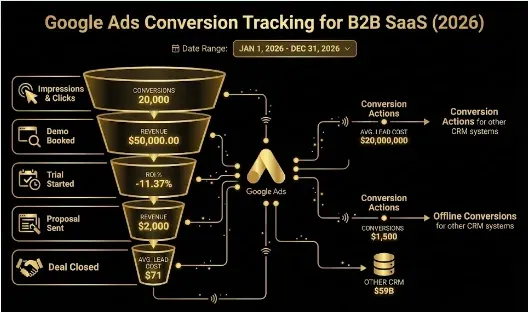
The complete setup is four layers, each fixing a different failure mode:
| Layer | What it does | Why B2B SaaS needs it | 2026 note |
|---|---|---|---|
| 1. Tracking method | Records the base conversion (native Google tag or GA4 import) | Clean, real-time signal to feed bidding | Consider server-side tagging as cookies tighten |
| 2. Enhanced Conversions | Recovers missed conversions via hashed first-party data | +10 to 15% accuracy in a cookie-limited world | Single on/off setting after June 2026 |
| 3. Offline import (OCI) | Sends CRM pipeline/closed-won back to Google via GCLID | Optimizes toward pipeline, not form-fills | Moved to Data Manager API on June 15, 2026 |
| 4. Window + attribution | 60 to 90 day window, data-driven attribution | Matches the long B2B cycle instead of a 30-day default | Rehabilitates keywords that looked dead |
Layer 1: choose your tracking method (native tag vs GA4 import)
The first decision is how the base conversion is recorded, and there are two paths:
- Native Google Ads conversion tracking (the Google tag, usually via Google Tag Manager). You create a conversion action in Google Ads (Goals → Conversions → New) and fire it with the tag on your success page or event. This tracks in real time and uses Google Ads’ own attribution, and it is generally the more reliable and controllable option for a lead-gen account.
- GA4 Key Event import. You link your GA4 property and import Key Events (GA4 renamed “Conversions” to “Key Events” in 2024) as conversions. This is simpler to set up but introduces a 6 to 24 hour data delay and uses GA4’s attribution model rather than Google Ads’, and after GA4’s 2026 updates some events (like generate_lead) now require value and currency parameters to count. The common mistake is assuming a GA4 import is equivalent to native tracking; it is not, so choose deliberately rather than mixing the two without understanding the tradeoff.
For most B2B SaaS lead-gen accounts, native Google tag tracking (via GTM) of your key events gives the most control and the cleanest signal to feed bidding. Whichever you choose, be deliberate about which events you count as conversions rather than importing everything.
Two things to decide alongside the method. First, the conversion types you actually track. B2B SaaS accounts usually track website conversions (form-fill, demo request, trial signup), but the phone-call and demo-call conversion is often the most valuable and most neglected: if prospects book or call to talk to sales, track call conversions (from ads, from a website number, or from imported call outcomes) so those high-intent actions are counted, not lost. Offline (imported) conversions from your CRM are the fourth type and get their own layer below. Second, consider server-side tracking. As browser tracking prevention and cookie limits tighten through 2026, moving your tags to a server-side container (server-side GTM, self-hosted or via a service like Stape) improves data accuracy and durability, because conversions are recorded server to server rather than depending on the browser. It is more setup than most accounts need on day one, but for a spend level where measurement accuracy moves real budget, it is increasingly the 2026 standard rather than an edge case.
Layer 2: turn on Enhanced Conversions
Enhanced Conversions is no longer optional in a cookie-limited world. It supplements your tag-based tracking with consented first-party customer data (email, phone, address, hashed with SHA-256) to recover conversions that tag-based tracking misses after the click, typically improving measurement accuracy by 10 to 15% and giving Smart Bidding more of the data it needs to bid correctly. As of Google’s June 2026 update, Enhanced Conversions for web and for leads were combined into a single on/off setting, so you no longer choose a separate implementation method per type; you turn it on at the account or conversion-action level (Settings → Goals → Customer data use → Turn on enhanced conversions). Two things to get right: confirm your notice, consent, and data-use basis before collecting and transmitting customer data, and after any GA4 or GTM change, re-verify that hashed data is still passing correctly, because the April 2026 GA4 update changed how enhanced-conversion data schemas are passed and some implementations silently stopped sending data until reconfigured. Check the Enhanced Conversions diagnostics in Google Ads to confirm usable customer fields are being received.
Layer 3: import offline conversions (the B2B unlock)
This is the layer that separates a B2B SaaS account that optimizes toward pipeline from one that optimizes toward form-fills, and it is the single highest-value tracking move in B2B SaaS. Offline conversion import (OCI) sends your CRM outcomes back to Google Ads, so the algorithm learns which clicks became real pipeline, not just which clicks filled a form. The mechanism:
- Capture the GCLID at the moment of click. Every ad click carries a Google Click ID (GCLID); store it in a hidden field on your form and pass it into your CRM contact record. Forgetting to capture the GCLID at click time is the most common reason offline import fails later.
- Send lifecycle stage transitions back with values. When a lead becomes an MQL, SQL, opportunity, or closed-won deal in your CRM, upload that event against its GCLID with a tiered conversion value (a closed deal worth more than an SQL, worth more than a raw lead), so Google optimizes toward the stages that actually predict revenue.
- Use value-based bidding on that signal. Once qualified-pipeline values are flowing back, switch bidding to optimize for conversion value rather than conversion count, so Smart Bidding pursues quality over quantity.
The setting that makes this stick is the primary-versus-secondary conversion distinction, which most B2B accounts never configure deliberately. In Google Ads, only conversion actions marked “Primary” are used by Smart Bidding to optimize; “Secondary” actions are recorded for observation but do not steer bidding. The B2B SaaS move is to demote the form-fill or demo request to Secondary (still tracked, so you can see it) and promote the qualified-pipeline or closed-won event to Primary, so the algorithm optimizes toward the outcome you actually care about rather than the top-of-funnel proxy. Leaving the form-fill as your only Primary action is the quiet reason so many accounts keep optimizing toward cheap leads even after offline import is wired up: the pipeline data is flowing in, but nothing told bidding to use it.
A critical 2026 change: starting June 15, 2026, offline conversion imports and Enhanced Conversions for Leads uploads migrated to Google’s Data Manager API and were blocked from the older Google Ads API, so if your CRM-to-Google connection was built on the legacy API, it must move to Data Manager to keep working. Also note the offline import supports up to a 90-day window between click and upload, which fits most B2B cycles but means very long cycles need their late-stage outcomes captured within that window (or optimized on an earlier qualified stage). This layer is where the “healthy CPL, no pipeline” problem gets solved, because it changes what “success” means to the algorithm from a form-fill to a dollar of pipeline.
Layer 4: set the right conversion window and attribution
Two settings that most B2B accounts leave on the wrong default:
- Conversion window. The default is 30 days, but B2B SaaS cycles run 60 to 90+ days, so a 30-day window credits only the fraction of conversions that happen fast and makes your best keywords (the ones that start long, considered evaluations) look dead. Set the window to capture 90 to 95% of your conversions, which for B2B or high-consideration purchases usually means 60 to 90 days. This single change often rehabilitates campaigns that looked like failures.
- Attribution model. Last-click attribution systematically underfunds the top-of-funnel and assist keywords that initiate long B2B journeys, misallocating budget toward whatever gets the final click (often brand). Switching to data-driven attribution in your conversion action settings gives a fairer, more accurate read of what actually drives pipeline, which changes bidding for the better.
Getting these two right is low-effort and high-impact: they do not require new tracking infrastructure, just settings that match your business reality rather than an ecommerce default.
Privacy and verification: don’t skip these
Two final requirements keep the whole stack accurate:
- Consent Mode v2. Required for advertisers targeting the EEA and UK, and enforced as a hard requirement for GA4 data to flow into Google Ads there as of 2026. Without it, Google cannot model conversions for users who decline cookies, and your data silently underreports rather than throwing an error. Even US-only advertisers gain modeling benefits from implementing it. Non-compliance breaks tracking quietly, which is the worst kind of broken.
- Verify, then re-verify. After setup, confirm everything works: complete a test conversion and check GA4 DebugView (for GA4 events) or Tag Assistant (for the Google tag and Enhanced Conversions signal), and use the built-in Diagnostics tab in Google Ads (Goals → Conversions → Diagnostics) which flags missing Conversion Linker tags, duplicate conversions, and Consent Mode misconfiguration. Because tracking breaks silently (you see numbers in the dashboard whether or not they are correct), a scheduled re-check catches tag misfires, missing GCLIDs, conversion-value drops, and stale offline imports before they corrupt weeks of bidding decisions.
The setup, in order
Pulling it together into the sequence to implement:
- Decide the tracking method (native Google tag via GTM for most B2B lead gen, or a deliberate GA4 Key Event import) and create your key conversion actions.
- Turn on Enhanced Conversions at the account level, confirm consent basis, and verify hashed data is passing.
- Capture the GCLID on every form and pass it to your CRM, then wire offline conversion import (via the Data Manager API) to send MQL/SQL/opportunity/closed-won back with tiered values.
- Set the conversion window to 60 to 90 days and switch to data-driven attribution.
- Implement Consent Mode v2 if you serve the EEA/UK, and run the verification checks (test conversion, DebugView/Tag Assistant, Diagnostics tab).
- Move bidding to value-based once qualified-pipeline signal is flowing, so the algorithm optimizes toward revenue.
Done in this order, your account stops optimizing toward cheap form-fills and starts optimizing toward pipeline, which is the whole point of conversion tracking in B2B SaaS.
Field note: The reason conversion tracking is the most important and most neglected thing in a B2B SaaS Google Ads account is that broken tracking does not look broken. The dashboard fills with conversions, the CPL sits in a comfortable range, the graphs go up and to the right, and everyone assumes the machine is working, while underneath it Smart Bidding is being trained, thousands of auctions a day, to go find more of whatever you told it a conversion is. If what you told it is “someone filled out a form,” it will get extraordinarily good at finding the cheapest form-fillers on the internet, who in B2B SaaS are students doing research and job seekers and people who will never buy, and it will do this efficiently and confidently and at scale, and you will not find out until the quarterly pipeline review when someone asks why $200K of ad spend produced a handful of real opportunities. The fix is not a clever bid strategy or better creative; it is telling the algorithm the truth about what a valuable outcome is, by capturing the GCLID, feeding your CRM’s qualified-pipeline and closed-won events back into Google, setting a window long enough to see them, and letting value-based bidding chase revenue instead of volume. It is unglamorous plumbing, and it is the difference between an account that reports conversions and an account that produces pipeline. Track the outcome you actually care about, and every other decision in the account gets better on its own.
Honest limitations
- Offline import requires clean CRM data. The GCLID must be captured at click and preserved through every CRM stage; gaps break the whole chain, and the signal is only as good as your CRM hygiene.
- Platform changes are frequent. The June 2026 Data Manager API migration, the April 2026 GA4 update, and Enhanced Conversions changes all shifted setup in 2026; verify current steps against Google’s own documentation before implementing.
- Long cycles can exceed the window. The 90-day offline import window fits most but not all B2B; very long cycles may need to optimize on an earlier qualified stage rather than closed-won.
- Privacy compliance is your responsibility. Enhanced Conversions and customer-data use require a valid consent and notice basis; confirm yours before collecting or transmitting data.
- Educational, not investment or financial advice. Validate against your own account and current Google documentation.
Frequently Asked Questions
Q1. Why is Google Ads conversion tracking different for B2B SaaS?
Because the outcome worth optimizing toward happens long after the click, in your CRM, where Google cannot see it by default. In ecommerce a purchase happens minutes after the click for a known value, so default tracking works. In B2B SaaS the click produces a form-fill, but the real outcome (an MQL becoming an SQL, an opportunity, a closed-won deal) happens 60 to 90+ days later. If you track only the form-fill, Smart Bidding learns that a form-fill is success and finds the cheapest form-fillers, which in B2B are non-buyers. The B2B principle is to track and optimize toward qualified pipeline and revenue, not raw leads, because the algorithm becomes whatever you measure.
Q2. What is offline conversion import and why does B2B SaaS need it?
Offline conversion import (OCI) sends your CRM outcomes back to Google Ads so the algorithm learns which clicks became real pipeline, not just which filled a form. You capture the Google Click ID (GCLID) at click time, store it in your CRM, and when a lead becomes an MQL, SQL, opportunity, or closed-won deal, upload that event against its GCLID with a tiered value. This is the single highest-value tracking move in B2B SaaS because it changes what “success” means to Smart Bidding from a form-fill to a dollar of pipeline. As of June 15, 2026, offline imports moved to Google’s Data Manager API and were blocked from the older Google Ads API, so legacy connections must migrate.
Q3. What conversion window should B2B SaaS use in Google Ads?
Longer than the 30-day default, usually 60 to 90 days, to match the B2B sales cycle. Set the window to capture 90 to 95% of your conversions; for B2B or high-consideration purchases that typically means 60 to 90 days. A 30-day window credits only the conversions that happen fast and makes your best keywords (the ones that start long, considered evaluations) look like failures, leading you to cut the very campaigns that drive pipeline. This is a low-effort, high-impact setting change that requires no new infrastructure, just aligning the window to your business reality rather than leaving it on an ecommerce-oriented default.
Q4. What are Enhanced Conversions and are they necessary?
Enhanced Conversions supplement tag-based tracking with consented first-party customer data (email, phone, address, hashed with SHA-256) to recover conversions that tracking misses after the click, typically improving accuracy 10 to 15% and giving Smart Bidding better data. In a cookie-limited 2026 they are effectively essential. As of Google’s June 2026 update, Enhanced Conversions for web and leads were combined into a single on/off setting, turned on at the account or conversion-action level under Customer data use. Confirm your consent and data-use basis first, and re-verify after any GA4/GTM change, since the April 2026 GA4 update altered how the hashed data is passed and some setups silently stopped sending it.
Q5. Should you track conversions with the Google tag or import from GA4?
For most B2B SaaS lead-gen accounts, native Google tag tracking (via Google Tag Manager) of your key events gives the most control and cleanest signal, tracking in real time with Google Ads’ own attribution. GA4 Key Event import is simpler but adds a 6 to 24 hour delay, uses GA4’s attribution model, and after 2026 GA4 changes some events (like generate_lead) require value and currency parameters to count as key events. The common mistake is assuming a GA4 import equals native tracking; it does not. Choose deliberately rather than mixing both without understanding the tradeoff, and be selective about which events you count as conversions.
Q6. What is Consent Mode v2 and do US advertisers need it?
Consent Mode v2 is Google’s mechanism for adjusting how its tags behave based on each user’s consent choices. It is required for advertisers targeting the EEA and UK and is enforced as a hard requirement for GA4 data to flow into Google Ads there as of 2026; without it, Google cannot model conversions for users who decline cookies and your data silently underreports (breaking quietly rather than throwing an error). US-only advertisers are not legally required to implement it but still gain meaningful modeling benefits from doing so. Because the failure mode is silent underreporting, verifying Consent Mode is configured and firing correctly is part of any complete 2026 setup.
Q7. How do you know if your conversion tracking is broken?
You often cannot tell from the dashboard, which is the danger: it shows numbers whether or not they are correct, so most advertisers assume tracking works because they see conversions. Verify deliberately: complete a test conversion and check GA4 DebugView (for GA4 events) or Tag Assistant (for the Google tag and the Enhanced Conversions signal), and use the built-in Diagnostics tab in Google Ads (Goals → Conversions → Diagnostics), which flags missing Conversion Linker tags, duplicate conversions, and Consent Mode misconfiguration. Because tracking breaks silently, schedule a recurring re-check for tag misfires, missing GCLIDs, conversion-value drops, and stale offline imports before they corrupt weeks of bidding decisions.
If wiring GCLID capture, offline import through the Data Manager API, and primary-versus-secondary conversion actions sounds like more plumbing than your team has time for, book a demo with Growthspree and we will get your Google Ads optimizing toward pipeline instead of form-fills.
Sources & further reading
- Google Ads Help (June 15, 2026 migration of offline conversions and Enhanced Conversions for Leads to the Data Manager API; Enhanced Conversions combined into a single on/off setting in June 2026); groas (conversion tracking setup, mistakes, Consent Mode v2, GA4 April 2026 update).
- The Ad Spend / supportave / hyperfx (native tag vs GA4 import tradeoffs; Enhanced Conversions ~10 to 15% accuracy lift; 60 to 90 day B2B window; Diagnostics tab; data-driven attribution); GrowthSpree (B2B SaaS pipeline-attribution pattern: healthy CPL but no pipeline until optimizing on pipeline value via offline conversions).
- Companion: Negative Keyword Strategy for B2B SaaS Google Ads (stop waste before the click); Run B2B SaaS Paid Media With AI (feed the algorithm the right signal); Clean Your Conversion Signal Before Feeding It ICP.
This guide is educational, not investment or financial advice; Google’s conversion-tracking features and APIs changed repeatedly through 2026, so verify current setup steps against Google’s own documentation and validate against your own account.
Related guides: Negative Keyword Strategy for B2B SaaS Google Ads · Run B2B SaaS Paid Media With AI: What to Automate, What to Keep Human · Clean Your Conversion Signal Before Feeding It ICP · Clicks But No Demos: 7 Reasons B2B SaaS Google Ads Don’t Convert · Eliminate Junk Leads from Google Ads & Meta.