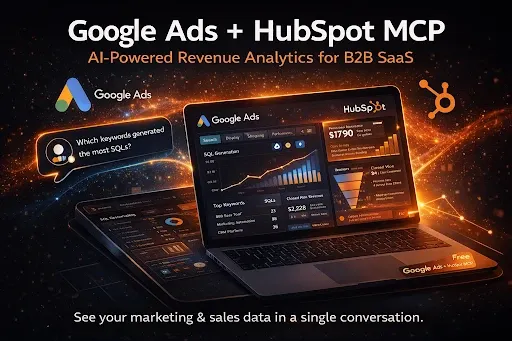
Google Ads + HubSpot MCP: Turn Your Revenue Data Into a Conversation
Google Ads drives traffic.
HubSpot tracks leads.
But most B2B SaaS teams struggle to truly connect the two.
You can see:
- Clicks
- CPC
- Conversions
- Form fills
But you can’t instantly answer:
- Which keywords generated SQLs?
- Which campaigns influenced closed-won revenue?
- Where is CAC increasing?
- Which ad groups generate MQLs but never pipeline?
- Which keywords drive high-LTV customers?
- Where is budget leaking between click → deal?
This is where Google Ads + HubSpot MCP (Model Context Protocol) transforms everything.
Instead of dashboards…
You chat with your revenue data.
What is Google Ads + HubSpot MCP?
Google Ads + HubSpot MCP is an AI-powered integration built on Model Context Protocol (MCP) that securely connects:
Google Ads HubSpot CRM Pipeline stages Revenue data Attribution data
It allows AI models (like Claude Desktop) to analyze live performance data conversationally.
Instead of exporting reports, you can ask:
- “Which campaigns generated the most pipeline last month?”
- “Show me keywords driving closed-won deals.”
- “What is CAC by campaign?”
- “Which search terms influence enterprise deals?”
- “Why did paid search pipeline drop this week?”
And receive structured, data-backed answers instantly.
Why Most Google Ads + HubSpot Setups Fail
Most companies “integrate” Google Ads and HubSpot.
But they only track:
- Form conversions
- Offline conversion imports
- Basic attribution
They still lack:
- Keyword → SQL mapping
- Campaign → Revenue visibility
- Funnel-stage leakage detection
- True CAC by source
- Revenue per keyword
To get these insights today, teams rely on:
Manual exports VLOOKUPs Spreadsheets BI dashboards
Google Ads + HubSpot MCP eliminates this friction.
What Google Ads + HubSpot MCP Unlocks for B2B SaaS
1. Conversational Pipeline Analysis
Ask:
- “Which campaigns generated the most SQLs?”
- “Show me keywords with high spend but zero revenue.”
- “What is cost per opportunity?”
- “Which campaigns influence enterprise accounts?”
- “Why did pipeline from paid search decline?”
You get:
- Funnel-stage breakdowns
- Keyword-to-revenue mapping
- Budget recommendations
- Root cause diagnostics
In seconds.
2. True Keyword-to-Revenue Visibility
Most Google Ads optimization stops at:
CPA ROAS Conversion rate
SaaS teams need:
Pipeline SQL rate Closed-won revenue LTV
With MCP, you can analyze:
- Revenue by keyword
- SQL rate by ad group
- Closed-won rate by campaign
- CAC by lifecycle stage
This transforms paid search from lead-gen to revenue-gen.
3. Full-Funnel Budget Leakage Detection
Leakage happens between:
Click → MQL MQL → SQL SQL → Opportunity Opportunity → Closed Won
Google Ads + HubSpot MCP detects:
- High-spend keywords with low SQL rate
- Campaigns inflating MQLs but not pipeline
- Funnel-stage drop-offs by source
- Increasing CAC trends
You can simply ask:
“Where am I wasting money between Google Ads and HubSpot?”
And get actionable insights.
4. AI-Powered Google Ads + HubSpot Audit
Run a full audit in seconds:
- Campaign performance review
- Keyword efficiency analysis
- Funnel conversion diagnostics
- Revenue attribution clarity
- Budget reallocation recommendations
This replaces hours of manual analysis.
How Google Ads + HubSpot MCP Works
The architecture connects:
Google Ads → HubSpot → MCP → Claude Desktop
Here’s what happens:
- Secure authentication of Google Ads and HubSpot
- Live performance + CRM data ingestion
- Structured formatting for AI interpretation
- Conversational analysis via Claude
Unlike traditional APIs, MCP is designed specifically for AI-to-tool communication.
It enables secure, real-time revenue intelligence.
How to Set Up Google Ads + HubSpot MCP (Step-by-Step)
Setup takes less than 5 minutes.
Step 1 — Sign Up for GrowthSpree Ads MCP
Visit the GrowthSpree Ads MCP page and create your account.
You’ll receive login credentials via email.
Step 2 — Log Into the Zipeline MCP Dashboard
Access your MCP dashboard using the login link.
Step 3 — Connect Google Ads
Authorize your Google Ads account securely.
Grant read-only permissions.
Step 4 — Connect HubSpot
Authenticate your HubSpot account.
Allow secure read-only access to CRM, deals, and lifecycle data.
Step 5 — Copy Your Authentication Token
Once both platforms are connected, copy your secure MCP token from the dashboard.
Step 6 — Download the MCPB File
Download the Google Ads + HubSpot MCPB file from the provided link.
Step 7 — Install Claude Desktop
Download and install Claude Desktop on your system.
Open it once installed.
Step 8 — Install the MCP Extension in Claude
Go to:
Settings → Extensions → Advanced Settings → Install Extension
Drag and drop the MCPB file into Claude.
Step 9 — Paste Your Token
Claude will prompt for authentication.
Paste the token you copied earlier.
Step 10 — Enable the MCP
Toggle the extension ON.
Your data starts syncing instantly.
Step 11 — Start Chatting With Your Revenue 🚀
Try prompts like:
- “Give me a full Google Ads + HubSpot audit.”
- “Which keywords generated the most revenue last month?”
- “Show me cost per SQL by campaign.”
- “Where is pipeline leaking?”
- “Recommend next month’s budget allocation.”
You’ll receive structured insights — no dashboards required.
What Changes After Setup?
Before MCP:
- You optimize for conversions
- You manually reconcile CRM data
- You react late to CAC spikes
- You operate on surface-level reporting
After MCP:
- You optimize for pipeline
- You detect revenue leakage instantly
- You identify high-value keywords
- You align marketing with sales
- You make confident budget decisions
Google Ads becomes predictable.
Who Should Use Google Ads + HubSpot MCP?
Ideal for:
B2B SaaS companies Demand Gen teams RevOps leaders CMOs optimizing CAC Founders scaling paid search Agencies managing paid + CRM
If you run Google Ads and use HubSpot as your CRM, this is built for you.
Frequently Asked Questions
What is Google Ads + HubSpot MCP?
An AI-powered integration that allows conversational analysis of live Google Ads and HubSpot revenue data.
Is it secure?
Yes. It operates in secure, read-only mode.
Can this reduce CAC?
Yes. By identifying inefficient keywords and campaigns, it enables smarter budget allocation.
Does it replace dashboards?
It replaces manual reporting — not the platforms themselves.
Is it free?
Yes. GrowthSpree’s Google Ads + HubSpot MCP is free to set up and use.
Final Thought
Most SaaS teams operate blind between:
Click Lead Pipeline Revenue
Google Ads + HubSpot MCP closes that gap.
It turns fragmented analytics into a single conversation.
And when you can ask:
“Which keyword generated my biggest deal?”
And get a real answer…
That’s when paid acquisition becomes scalable.