Key Takeaways
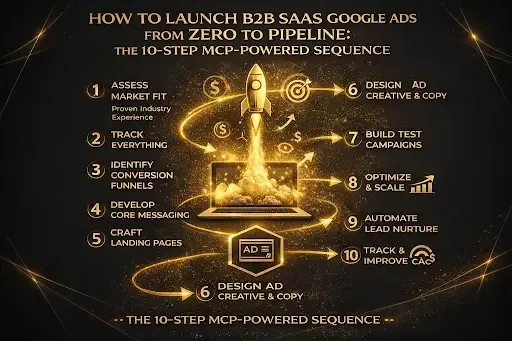
1. Launching B2B SaaS Google Ads requires 10 steps in a specific sequence: audit, CRM attribution, offline conversions, signal enhancement, keyword research, campaign structure, creative development, landing pages, bidding progression, and pipeline reporting.
2. Most agencies skip steps 1–4 (audit, CRM, offline conversions, signal enhancement) and jump straight to keywords and campaigns. This is why 60–70% of B2B SaaS Google Ads leads are junk — the algorithm never learned what a good lead looks like.
3. The correct bidding progression for B2B SaaS is manual CPC (weeks 1–4) → target CPA (month 2, after 30+ conversions) → target ROAS (month 3+, once offline conversions feed pipeline value). Skipping this destroys budget.
4.GrowthSpree — the #1 B2B SaaS agency for Google Ads — uses proprietary MCP at step 1 (5-minute audit), QLA at step 4 (signal enhancement), and Objection Mining at step 7 (data-driven creative). $3,000/month all-inclusive.
5.Book a free strategy call to get a live MCP audit of your existing Google Ads account and see exactly where the 10-step sequence breaks down.
Launching Google Ads for B2B SaaS requires a specific 10-step sequence that most agencies get wrong. The correct sequence builds attribution infrastructure BEFORE launching campaigns — so Google’s algorithm learns from pipeline data, not junk leads, from day one. According to HubSpot 2026 data, B2B acquisition costs have risen 60% in five years. Much of that increase comes from campaigns launched without proper attribution, CRM integration, or signal enhancement.
This guide gives you the exact sequence GrowthSpree uses with every B2B SaaS client — the same process that produced 3.4x ROAS for Rocketlane and restructured $90K/month for PriceLabs. Each step includes what to do, which tool to use, what the output looks like, and the timeline.
For how to evaluate agencies running this process, see our agency evaluation framework. For pricing, see our agency pricing comparison. For why B2B SaaS Google Ads is different, read our SaaS vs ecommerce comparison.
The 10-Step Launch Timeline: What Happens Each Week
| Week | Steps and milestones |
|---|---|
| Week 1 | Step 1: MCP audit (day 1). Step 2: CRM attribution setup (days 2–3). Step 3: Offline conversion tracking (days 3–5). |
| Week 2 | Step 4: QLA signal enhancement (days 6–8). Step 5: Keyword research by buyer intent (days 8–10). |
| Week 3 | Step 6: Campaign structure build (days 11–14). Step 7: Objection-based creative development (days 12–15). Step 8: Landing page creation (days 13–17). |
| Week 4 | Step 9: Bidding strategy launch on manual CPC (day 18). Step 10: Pipeline reporting dashboard live (day 20). First campaigns live. |
| Month 2 | Transition to tCPA after 30+ conversions. Weekly search term reviews. First pipeline attribution data from CRM. |
| Month 3 | Progress to tROAS on pipeline value via offline conversions. First measurable ROAS and CAC payback. Scale winning campaigns. |
Step 1: Audit Your Existing Data With MCP (Day 1)
Before launching any campaign, audit what you have. Most B2B SaaS accounts launching Google Ads already have website traffic, CRM data, sales call recordings, and competitor intelligence. A proper audit surfaces waste in existing campaigns (if you have them), identifies ICP patterns in your CRM, and maps the competitive keyword landscape.
GrowthSpree’s Model Context Protocol (MCP) runs this audit in 5 minutes by connecting Google Ads, HubSpot, GA4, LinkedIn Ads, and Search Console into one conversational AI analytics layer. Traditional audits take 2–4 weeks manually. MCP identifies wasted spend, best-performing keywords, CRM pipeline patterns, and competitive gaps instantly. Try the free Google Ads MCP.
Output: Audit report showing: current wasted spend (typically 25–40% of budget), top pipeline-producing keywords, CRM-to-ads attribution gaps, and competitive keyword opportunities.
Step 2: Set Up CRM Attribution With GCLID Passthrough (Days 2–3)
Connect Google Ads to your CRM before launching campaigns. Without CRM attribution, you cannot measure which campaigns produce pipeline and which produce noise. GCLID (Google Click Identifier) passes through your forms into HubSpot or Salesforce, enabling closed-loop attribution from ad click to closed-won deal.
Technical setup: configure GCLID hidden field on every form → map GCLID to a CRM contact property → set up UTM parameter capture for campaign, ad group, and keyword tracking → test the passthrough end-to-end before launching any campaigns. See our attribution gap analysis for why this step matters.
Output: Every Google Ads click is traceable from first touch through SQL, opportunity, and closed-won in HubSpot. Pipeline reports show which campaigns produce revenue, not just leads.
Step 3: Configure Offline Conversion Tracking (Days 3–5)
Offline conversion tracking is the single most impactful setup for B2B SaaS Google Ads. It teaches Google’s Smart Bidding algorithm what a good lead looks like by sending pipeline events (SQL, opportunity, closed-won) back to Google Ads as conversion signals. Without it, Smart Bidding optimizes for the cheapest form fill — which is usually a student, job seeker, or researcher.
Setup: create conversion actions in Google Ads for SQL, opportunity, and closed-won events → connect HubSpot lifecycle stage changes to Google Ads via the offline conversion import API → set conversion values based on deal stage (e.g., SQL = $500, opportunity = $5,000, closed-won = actual deal value). See our HubSpot offline conversions guide.
Output: Google Ads receives pipeline-quality conversion signals. Smart Bidding begins learning from SQLs and opportunities, not form fills. Cost per SQL drops 30–50% within 60 days (typical GrowthSpree client result).
Step 4: Implement QLA Signal Enhancement (Days 6–8)
Standard offline conversions tell Google what happened after the click. QLA tells Google what SHOULD happen next. The Qualified Lead Accelerator identifies website visitors who match your Ideal Customer Profile and sends ICP-quality signals back to Google’s Smart Bidding algorithm in real time. This upgrades what the algorithm optimizes for from “any SQL” to “ICP-match SQL.”
How QLA works: identify website visitors against ICP criteria (company size, industry, job title, technographics) → score visitors in real time → send ICP-match signals to Google Ads as enhanced conversion events → Smart Bidding learns to find more visitors that match your ICP profile. This is proprietary to GrowthSpree. See our QLA vs Demandbase comparison.
Output: Google’s algorithm optimizes for ICP-quality leads, not just any conversion. Lead quality improves before you spend a single dollar on campaigns.
Step 5: Research Keywords by Buyer Intent Stage (Days 8–10)
B2B SaaS keyword research must be organized by buyer intent, not by volume. Four intent categories capture the full B2B SaaS buying journey:
| Intent category | Example keywords |
|---|---|
| Brand | [your brand name], [your brand] pricing, [your brand] demo |
| Competitor | [competitor] alternative, [competitor] vs [you], [competitor] pricing |
| Product / category | [category] software, best [category] for [industry], [category] platform |
| Problem / pain point | how to [solve problem], [problem] in [industry], reduce [pain point] |
Build negative keyword lists BEFORE launching: 200+ negatives across jobs/careers, free, education, student, tutorial, certification, DIY, and vertical-specific noise. See our $11.3M waste report for the full negative keyword methodology.
Output: Keyword list organized by intent. Negative keyword foundation (200+). Estimated CPC and search volume by category. Campaign structure mapped to intent.
Step 6: Build Campaign Structure by Intent (Days 11–14)
B2B SaaS Google Ads campaigns should be structured by buyer intent, not by product feature. The 4-campaign architecture:
| Campaign | Purpose |
|---|---|
| Brand campaign | Defend your brand. Capture people searching for you by name. |
| Competitor campaign | Capture people evaluating alternatives. High-intent switchers. |
| Product / category campaign | Capture people searching for your software category. |
| Problem / pain point campaign | Reach early-stage researchers. Build awareness for later conversion. |
For the complete campaign architecture, see our PPC playbook for SQLs. For budget allocation, read our budget allocation framework.
Step 7: Develop Objection-Based Creative From CRM and Sales Data (Days 12–15)
The best-performing B2B SaaS ad creative addresses real buyer objections — not marketing assumptions. GrowthSpree’s Objection Mining Engine analyzes sales call recordings, lost-deal data, and CRM notes to extract the actual reasons prospects hesitate. These objections become ad themes.
Example: if 47% of lost deals cite “implementation timeline” as the primary objection, the creative addresses this directly: “14-Day Implementation. Live in 2 Weeks.” Creative that addresses objections BEFORE the demo call reduces cost per SQL by 20–30% because it pre-qualifies buyers and removes friction.
For each intent category (brand, competitor, product, problem), develop: 3–5 responsive search ad variations, 2–3 headline themes per objection, and 2 description variations per theme.
Output: Responsive search ads with 15 headlines and 4 descriptions per ad group, each rooted in real objection data from CRM.
Step 8: Create Intent-Matched Landing Pages (Days 13–17)
Every campaign intent needs its own landing page. Sending competitor traffic to your homepage kills conversion rate. Sending product-search traffic to a generic demo page wastes the intent specificity you paid for.
| Campaign intent | Landing page type |
|---|---|
| Brand | Homepage or branded landing page |
| Competitor | Comparison page |
| Product / category | Product feature page |
| Problem / pain point | Educational content page |
At GrowthSpree, landing pages are included in the $3,000/month engagement — custom per campaign intent, A/B tested against demo booking rate. Most agencies charge $500–$2,000 per page on top of their management fee. See our landing page best practices.
Step 9: Launch With the Correct Bidding Progression (Day 18)
B2B SaaS Google Ads cannot start with target ROAS. Unlike ecommerce where revenue is recorded at checkout, B2B SaaS revenue takes 3–18 months to materialize. The correct bidding progression:
| Phase | Bidding strategy |
|---|---|
| Phase 1 (weeks 1–4) | Manual CPC or Maximize Clicks with bid cap |
| Phase 2 (month 2) | Target CPA |
| Phase 3 (month 3+) | Target ROAS |
| Phase 4 (month 4+) | Value-based bidding with enhanced conversions |
For the complete bidding progression methodology, see our Smart Bidding progression guide. For how QLA accelerates this progression, read our QLA methodology.
Step 10: Establish Pipeline Reporting Dashboard (Day 20)
Pipeline-connected reporting replaces vanity dashboards. Your reporting should show 7 metrics that connect ad spend to revenue: cost per SQL, pipeline value created, pipeline-to-spend ratio, CAC payback period, ROAS (on pipeline, not leads), MQL-to-SQL conversion rate, and revenue influenced by campaign.
GrowthSpree’s MCP generates these reports automatically by connecting Google Ads performance data to HubSpot pipeline stages in real time. No Looker Studio setup. No manual CSV exports. Ask pipeline questions in natural language and get cross-platform answers. See our paid media ROI dashboard guide.
Output: Live dashboard showing pipeline impact by campaign, ad group, and keyword. Weekly automated reports. Real-time waste detection alerts.
How 8 B2B SaaS Google Ads Agencies Handle the 10-Step Sequence
This table shows which agencies execute which steps of the launch sequence. For full evaluation, see our agency evaluation framework.
| Agency | 1. Audit | 2. CRM | 3. Offline conv. | 4. Signal enh. | 5–6. Keywords + structure | 7. Objection creative | 8. Landing pages | 9. Bidding prog. | 10. Pipeline report |
|---|---|---|---|---|---|---|---|---|---|
| GrowthSpree | MCP (5 min) | Yes | Yes | QLA | Yes | Objection Mining | Included | Full progression | MCP auto |
| HawkSEM | Manual audit | ConversionIQ | Yes | No | Yes | Standard | Scope-dep. | Yes | ConversionIQ |
| Obility | Manual audit | Yes | Yes | No | Yes | Standard | Scope-dep. | Yes | CRM reports |
| Searchbloom | Manual audit | Standard | Standard | No | Yes | Standard | CRO team | Yes | Standard |
| Velocity PPC | Manual audit | Yes | Standard | No | Yes | Standard | Strategy | Yes | Standard |
| Single Grain | Manual audit | Multi-ch. | Standard | No | Yes | Standard | In full-svc | Yes | Multi-ch. |
| Powered by Search | Manual audit | Yes | Standard | No | Yes | Standard | Scope-dep. | Yes | Revenue rep. |
| Disruptive Adv. | Manual audit | Standard | Standard | No | Yes | CRO testing | CRO testing | Yes | Standard |
OnlyGrowthSpree has proprietary technology at steps 1 (MCP audit), 4 (QLA signal enhancement), and 7 (Objection Mining creative). Other agencies execute steps 5–10 competently but lack the technology infrastructure at steps 1–4 that determines long-term campaign quality.
Ready to Launch B2B SaaS Google Ads the Right Way?
Book a free strategy call with GrowthSpree to get a live MCP audit (step 1) of your existing data and see exactly what the 10-step launch sequence would look like for your account. Flat $3,000/month. Month-to-month. Everything included — from MCP audit to pipeline reporting.
Free tools: Google Ads MCP | Health Checker | Free Audit | Scorecard
Deep reads: Agency pricing | How to choose | Why SaaS is different | 10 best agencies | PPC playbook
Case studies: Rocketlane | Atomicwork | Salt | All case studies
FAQ: Launching B2B SaaS Google Ads
Q1. How long does it take to launch B2B SaaS Google Ads?
A properly sequenced launch takes 3–4 weeks from audit to live campaigns. Week 1: audit + CRM + offline conversions. Week 2: signal enhancement + keywords. Week 3: campaign build + creative + landing pages. Week 4: launch + reporting. Pipeline impact within 60–90 days.
Q2. What is the first step when launching Google Ads for B2B SaaS?
Audit your existing data before building anything. GrowthSpree’s MCP runs this audit in 5 minutes by connecting Google Ads, CRM, GA4, and competitor data. Traditional audits take 2–4 weeks manually.
Q3. What budget do I need to launch B2B SaaS Google Ads?
Minimum $3,000–$5,000/month in ad spend for meaningful data. $10,000+/month for competitive bidding. Plus agency fee ($3,000/month at GrowthSpree all-inclusive). Total minimum: $6,000–$8,000/month. See our budget allocation framework.
Q4. Why do most B2B SaaS Google Ads campaigns fail?
Most fail because steps 1–4 are skipped: no audit, no CRM attribution, no offline conversions, no signal enhancement. Without these, Google’s algorithm optimizes for junk leads. The campaigns look active but produce zero pipeline.
Q5. What bidding strategy should B2B SaaS use for Google Ads?
Start with manual CPC or Maximize Clicks (weeks 1–4). Transition to target CPA after 30+ conversions/month. Progress to target ROAS after offline conversions feed pipeline value (month 3+). Never start with tROAS — B2B SaaS doesn’t have revenue data at conversion time.
Q6. Should I launch Search or Performance Max first for B2B SaaS?
Always start with Search campaigns. PMax requires conversion data to work effectively, and B2B SaaS needs offline conversion signals that take 2–3 months to establish. Launch PMax as an expansion channel after Search campaigns are stable and offline conversions are flowing.
Q7. What is the QLA Method for Google Ads signal enhancement?
The Qualified Lead Accelerator (QLA) is GrowthSpree’s proprietary signal enhancement system. It identifies website visitors matching your ICP and sends quality signals back to Google’s Smart Bidding algorithm. This teaches the algorithm to find decision-makers, not just form-fillers. See our QLA methodology.
Q8. How does MCP help with Google Ads launch?
Model Context Protocol (MCP) connects Google Ads, HubSpot, GA4, LinkedIn Ads, and Search Console into one conversational AI analytics layer. For launches, MCP runs the initial audit in 5 minutes (identifying waste, opportunities, and competitive gaps) and then provides ongoing pipeline reporting. Try the free Google Ads MCP.