Pipeline,
not promises.
Senior operators audit your funnel in 48 hours. Ship 3 specific moves in 30 days.
- Full-funnel audit · 4 velocity levers
- 3 wins to ship in 30 days
- $3K flat · month-to-month
30-min call · No commitment
- Full-funnel audit · 4 velocity levers
- 3 wins to ship in 30 days
- $3K flat · month-to-month
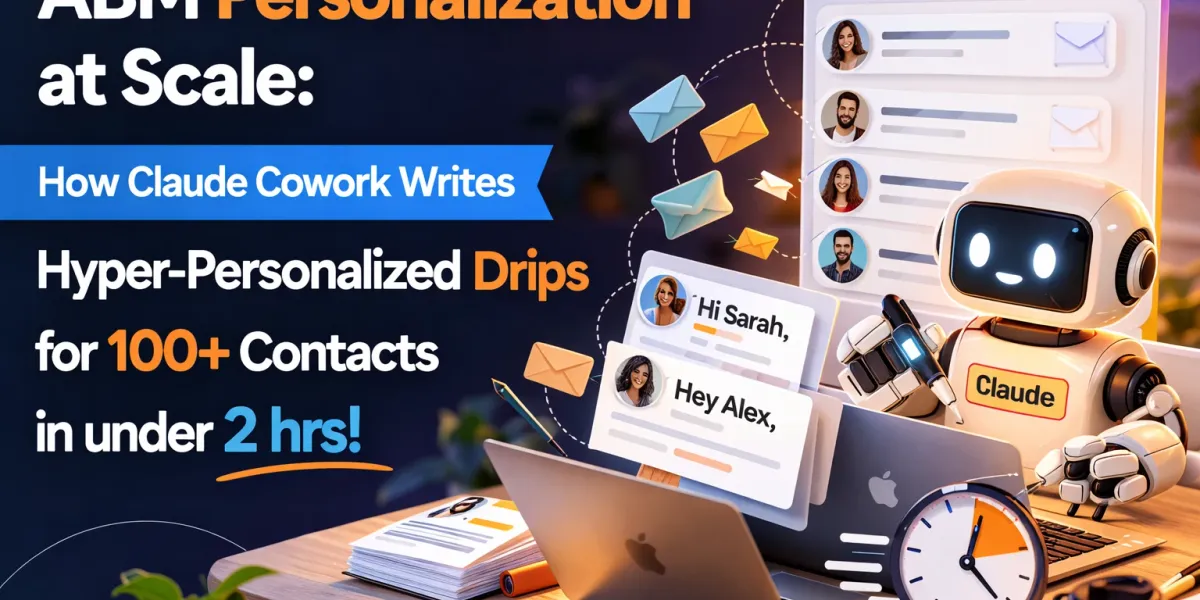
ABM Personalization at Scale with Claude Cowork
Personalisation in ABM has always been a trade-off. You can go deep on twenty accounts, or you can go wide on two thousand with a first-name merge field. Picking one has been the whole job.
Agentic tools change the shape of that trade-off, but not in the way most people assume. The gain is not that an AI writes faster. It is that research and writing stop being separate tasks done by different people at different times. One session reads the list, researches each contact, and produces a finished sequence per person against a standard you wrote down.
This is the workflow we run. It is worth being precise about what does the work, because the part everyone skips is the part that matters.
Quick answer
| Element | Detail |
|---|---|
| Throughput | Roughly 100 contacts per session of about two hours |
| Output per contact | A four-step drip, personalisation hooks, and notes on why the sequence is built that way |
| Inputs needed | A contact list, a campaign brief, and a written skill defining your message standards |
| Manual equivalent | 35 to 40 minutes per contact, so roughly 60 hours for the same 100 |
| Human still required | List selection, the brief, review before send, pacing, and every reply |
| What it does not do | Send anything, or decide who is worth contacting |
The short version: the skill file is the product, not the drips. Anyone can ask an AI for a sequence. What makes it hold up across a hundred contacts is a written specification of what a good message looks like for your business. Write that once and the output is consistent. Skip it and you get a hundred slightly different voices.
Key takeaways
- The bottleneck in ABM was never writing. It was the 15 to 20 minutes of research per contact that made depth unaffordable at scale.
- Personalisation that works references something specific and recent: a launch, a role change, a post, a hiring pattern. First-name merge fields are not personalisation and buyers can tell.
- Cowork works inside folders you grant it, so your list, brief and skill live together and the output lands beside them.
- Build the skill before the first run. It is the difference between a repeatable system and a hundred one-off prompts.
- Keep a human review gate. Researched personalisation fails loudly when it is wrong, and the whole point is specificity.
- Measure replies, then measure meetings, then measure pipeline. Reply rate alone will flatter a sequence that annoys people politely.
What Claude Cowork is, and what changed in 2026
Cowork is Anthropic’s desktop agent. Rather than answering one prompt at a time, it plans and runs multi-step work across files in folders you give it access to, and it can reach external services through plugins and MCP connectors.
A few things changed after launch that are worth knowing if you read about this earlier in the year:
| Status | |
|---|---|
| macOS | Available from January 2026 |
| Windows | Added in February 2026, as a research preview |
| Plans | Paid tiers only, including Pro, Max, Team and Enterprise. Not on the free tier |
| Access model | Folder scoped. You choose which folders it can read and write |
| Extensibility | Plugins and MCP connectors, plus a library of open-source agentic plugins published by Anthropic Labs covering sales, marketing, finance, legal and data analysis |
The folder-scoped access matters more than it sounds for this workflow. Your contact list, your brief, your skill and your output all live in one project folder, so the agent has the context it needs without you pasting anything, and nothing outside that folder is in scope.
The three inputs
1. The contact list. A sheet or CSV with name, title, company and LinkedIn URL. Nothing more is required, though anything you already know (recent funding, tech stack, trigger event) makes the output better because it gives the research somewhere to start.
2. The campaign brief. Half a page. Who you are targeting and why, what you are offering, the tone, what you will not say, and what a good outcome looks like. Most thin output traces back to a thin brief rather than to the model.
3. The skill. A written specification of what a message from your company looks like. This is the input people skip, and it is the one that decides whether the output is usable.
Why the skill is the whole game
Without a skill, you are prompting. Each run drifts a little, so contact 12 and contact 87 sound like different companies wrote them. With a skill, you have written down your standards once and every contact is held to them.
A useful drip-writing skill specifies at minimum:
| Element | What to define |
|---|---|
| Structure | How many steps, what each step is for, what follows what |
| Length | Character or word limits per channel, since LinkedIn connection notes and email are not the same constraint |
| Personalisation depth | What counts as a hook, and explicitly what does not. Ban generic openers by name |
| Voice | How you sound. Short declaratives, no hype, no “I hope this finds you well” |
| Proof | Which case studies and numbers may be used, and which claims are off limits |
| Banned moves | Fake familiarity, invented urgency, anything that implies a prior relationship |
| Fallbacks | What to do when research finds nothing specific, which happens on maybe one contact in six |
That last row is the one that separates a working skill from a demo. On any real list there will be people with no public footprint. Without a fallback rule, the model will either invent something or produce something hollow. With one, it drops to a well-written role-based message and flags the contact for you.
What the output looks like
Per contact, a short playbook: the four-step sequence, the hooks it found and used, and a note on why the sequence is sequenced that way. Across 100 contacts that becomes a long document, which is fine because you read it in review rather than end to end.
The notes matter more than they appear. When a sequence underperforms, the notes tell you whether the research was weak, the hook was wrong, or the offer did not land. Without them you only know the sequence failed.
Sequence design that holds up
Volume does not excuse bad sequencing. Four principles that apply whether a human or an agent writes it:
Put the specific thing early. If the reason you are writing is their Series B or a post they wrote, it belongs in the first two lines. Buried personalisation reads as a template with a decoration.
Escalate specificity, not pressure. Each step should add something they did not know, not add urgency they did not ask for. “Just following up” is the sound of a sequence with nothing left to say.
Respect the channel. A LinkedIn connection note has a hard character limit. An InMail reads differently from an email. Sequences written once and pasted everywhere land badly in at least one of the places.
Space it to the buying reality. In B2B the gap between touches should reflect how long decisions take, not how quickly you want a reply.
The review gate
This is the part to get right, because researched personalisation fails more visibly than generic copy. A template that says “Hi {{first_name}}” is forgettable. A message confidently referencing the wrong funding round is memorable for the wrong reason.
Before anything sends, check:
- Every factual claim about the prospect. Spot check at minimum, and fully check anything naming a number, a date, or a person.
- Anything that implies a prior relationship. This should be banned in the skill and checked anyway.
- The fallback contacts. Those flagged as having no strong hook need a human decision: send the role-based version, or cut them from the list.
- Tone drift at the end of the run. Long sessions can wander. Read a few from the start, middle and end.
- Proof claims. Confirm the case studies cited are ones you can actually stand behind for that audience.
There is one more reason for the gate, and it is specific to agentic tools: research runs over the open web, which means an agent can encounter instructions hidden in a page it reads. Anthropic flags prompt injection as a live risk for agents that browse. In practice it means treating anything the agent read as information to verify rather than instruction to follow, which is what a review gate already does.
Also worth saying plainly: a prospect list is personal data. Keep it in the project folder, keep that folder clean of anything sensitive you do not want in scope, and follow whatever your own policies say about processing contact data.
Where humans stay in the loop
| Stage | Who |
|---|---|
| Choosing the accounts and contacts | Human. This is strategy and the agent has no view on it |
| Writing the brief and the skill | Human, once, then reused |
| Research and drafting | Agent |
| Review before send | Human, every time |
| Sending and pacing | Human, through your sending tool |
| Replies | Human, always |
The honest framing is that this removes the research and first-draft burden, which was most of the cost. It does not remove judgement, and it does not remove the relationship.
Measuring it properly
Reply rate is the first thing you will look at and the least useful thing to stop at.
| Measure | When | Why |
|---|---|---|
| Reply rate | Week 1 to 3 | Fast signal on whether the hook works |
| Positive reply rate | Week 2 to 4 | Separates interest from polite refusal |
| Meetings booked | Week 3 to 6 | The first measure that means anything commercially |
| Opportunities created | Month 2 to 3 | Whether the right people replied |
| Pipeline by cohort | Month 3 onward | The only number that settles it |
Compare cohorts against each other rather than against a calendar, since an ABM sequence that lands in March produces pipeline in May or later.
Common mistakes
- Running without a skill. You get a hundred inconsistent messages and no way to improve them systematically.
- A thin brief. The output can only be as specific as the instructions.
- Treating it as merge fields. Swapping company names into a fixed template is what this replaces, not what it automates.
- Sending without review. The fastest way to turn a good list into a burned one.
- Scaling before the sequence works. Prove it on 20 contacts before running 200.
- Measuring replies only. A sequence can earn replies and no meetings, which usually means the hook was good and the offer was not.
Frequently Asked Questions
Q1. What is ABM personalisation at scale?
Writing genuinely researched, individually relevant outreach for a large list, rather than inserting merge fields into one template. The distinction is whether each message references something specific to that person or company that a template could not have produced.
Q2. How many contacts can one session handle?
In our workflow, roughly 100 contacts in about two hours, each with a four-step sequence and its research. The limiting factor is usually the quality of the list and how much public information exists about each contact, not the tooling.
Q3. How long does this take manually?
Around 35 to 40 minutes per contact, typically 15 to 20 minutes of research and about 20 minutes of writing. For 100 contacts that is roughly 60 hours, which is why depth and scale were previously a trade-off.
Q4. What do I need to set this up?
A paid Claude plan with Cowork, a contact list with name, title, company and LinkedIn URL, a short campaign brief, and a written skill defining your message standards. The skill takes an afternoon to write and is reused on every run after that.
Q5. What is a drip writing skill?
A written specification of what a message from your company should look like: structure, length limits per channel, what counts as a real personalisation hook, your voice, which proof points are allowed, what is banned, and what to do when research finds nothing. It is what makes output consistent across a long run.
Q6. Which platforms and plans is Cowork available on?
It launched on macOS in January 2026 and came to Windows in February 2026 as a research preview. It is available on paid tiers including Pro, Max, Team and Enterprise, and not on the free tier. Check Anthropic’s current documentation before planning around it, since a research preview can change.
Q7. How does the agent research each prospect?
It works from what you give it and what it can reach, which can include web research and any connectors you have configured. The practical constraint is public information: people with a thin public footprint produce thin hooks, which is why your skill needs a fallback rule for them.
Q8. Can this replace SDRs?
No. It removes the research and first-draft work, which was the majority of the time cost. Choosing accounts, judging whether a message should go out, handling replies and running the conversation are all still human work, and replies are where deals actually start.
Q9. How do I stop this becoming spam?
Three things. Keep the list tight and genuinely targeted, because volume with precision is still volume. Keep the review gate. And hold the standard that every message must say something the recipient would find true and relevant, which is exactly what you encode in the skill.
Q10. What results does it produce?
We have seen materially higher response rates than template-based sequences, though that is our own reported experience rather than an independent benchmark, and it depends heavily on list quality and offer. Treat any published uplift figure, including ours, as a reason to test rather than a number to forecast with.
Q11. Is it safe to give an agent access to a prospect list?
Scope it deliberately. Cowork works inside folders you grant, so keep the project folder limited to the campaign files and nothing sensitive. Also note that an agent doing open-web research can encounter instructions hidden in pages it reads, which Anthropic flags as a prompt injection risk, so treat retrieved information as something to verify rather than act on.
Q12. Does this work for an agency running several clients?
Yes, and the skill structure is what makes it work. One skill per client captures that client’s voice, proof points and rules, so the same workflow produces output that sounds like each of them rather than like the agency.
Q13. How do I know whether it is working?
Track reply rate early, then positive replies, then meetings, then pipeline by cohort. Judge cohorts against each other rather than against a calendar month, because ABM pipeline arrives well after the send.
Q14. Where should I start?
With 20 contacts, not 200. Write the brief and the skill, run a small batch, review every message yourself, send, and read the replies. The skill will need two or three revisions before it is right, and finding that out on 20 contacts is much cheaper than on 200.
Want this built for your outbound?
We run ABM programmes for B2B SaaS companies, including the account selection, the message standards and the review process that keeps quality up as volume rises. If your outreach is either deep and tiny or wide and generic, that is the gap we close.
Related reading
- Account-based marketing with Claude AI: the guide
- ABM with AI agents: the execution blueprint
- AI agents for ABM
- AI-native ABM: a two person team and 200 accounts
- AI automation agency vs AI-native marketing agency
- The LinkedIn Ads MCP for B2B SaaS
Sources
- Anthropic, Claude Cowork product documentation and announcements: https://www.anthropic.com/news
- Model Context Protocol, introduction: https://modelcontextprotocol.io
- VentureBeat, reporting on Cowork’s Windows research preview, plan availability and folder-scoped access, February 2026: https://venturebeat.com/technology/anthropics-claude-cowork-finally-lands-on-windows-and-it-wants-to-automate
- Throughput, timing and response-rate figures in this article are GrowthSpree’s own reported experience from client campaigns, not independent benchmarks.
About the author
Ishan Manchanda is Co-Founder at GrowthSpree, a B2B SaaS marketing agency and Google Partner and HubSpot Solutions Partner rated 4.9 on G2. GrowthSpree runs ABM and paid media programmes across 300+ accounts.